Ozil Goal AI Prompt: What to Write (and What Matters More)
 Ozil Goal AI
Making the Ozil goal video in a general AI video tool? What a good prompt looks like, why the reference clip and your photo matter more than the words, and when you need no prompt at all.
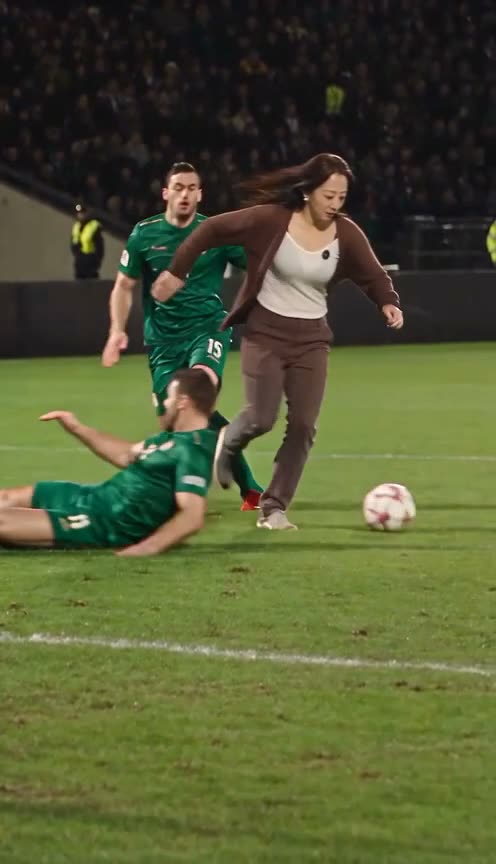
If you make the Ozil goal video on Ozil Goal AI, you do not write a prompt: you upload one photo and press Generate. This guide is for people who want to try it in a general AI video tool that takes a reference clip and a photo. It is what we learned from our own test renders.
The short version
Three things decide the result, in this order:
- The reference clip. The AI copies the movement from it, and it pulls faces from it too.
- Your photo. A large, clear face gives a likeness. A small face gives someone else.
- The prompt. It steers, but it cannot override the first two.
1. The reference clip matters most
In our tests, when the original scorer's face was clearly visible in the reference clip, the close-up shots drifted back towards his face, whatever the prompt said. Rewording the prompt did not fix it, and neither did switching to another service running the same kind of model.
What worked was a reference clip where the scorer is not a famous face, with plain advertising boards. The model then had nothing to drift towards and took the face from the photo.
Sound: a clip with the original match audio can be blocked by copyright checks. Mute the reference clip before you upload it and add the sound back afterwards in any editor.
2. The photo decides the likeness
Use a selfie or half-body photo where the face is large and in focus, one person, nothing covering the face. Full-body shots taken from a distance gave the worst results in our tests. The photo guide goes through it in detail.
3. What a good prompt does
A prompt that worked for us followed five rules:
- Appearance only from the photo. Face, skin tone, hair, clothes and accessories come from image 1. Add nothing the photo does not show.
- Movement only from the clip. The new scorer moves exactly like the original one, following video 1 frame by frame. Take no pose or expression from the photo.
- Rough timing, with the clip in charge. Describe the beats with "about": about 0–3 s the chip over the keeper, about 3–8 s the ball off the chest, about 8–14 s the two sliding defenders. Then say "if this description and the video differ, follow the video". Exact timestamps that do not match make things worse.
- Name what must not blend in. List the original scorer's visible features (hair, beard, kit) and say none of them should appear unless the photo shows them.
- Keep everything else. The keeper, defenders, crowd, stadium, lighting and camera stay as they are.
Keep the prompt generic. Do not write "a woman with long hair" or "a man with a beard": describe roles ("the person in image 1"), not looks, so the same prompt works for any photo.
A skeleton you can adapt
Replace the scorer in video 1 with the person in image 1. Appearance comes only from image 1: same face, skin tone, hair and clothes; add nothing image 1 does not show. Movement comes only from video 1, frame by frame: about 0–3 s the chip over the diving keeper, about 3–8 s the ball off the chest, about 8–14 s two defenders slide past. If this description and video 1 differ, follow video 1. Nothing of the original scorer's appearance carries over. Keep the keeper, defenders, crowd, stadium, lighting and camera unchanged.
When you do not need a prompt
If you just want the video, Ozil Goal AI has the reference clip, the prompt and the sound already set up. You add one photo, and get a 14-second vertical video with sound in 720p or 1080p, usually in 4 to 5 minutes.